ON THIS PAGE
GrahaJyoti exposes a stable, OpenAPI-documented astrology API at /api/v1. Because both
ChatGPT and Claude can consume OpenAPI specs — and because Claude Desktop speaks
MCP (Model Context Protocol) — you can plug GrahaJyoti into either assistant
in a few minutes. This post walks through the three most common setups, in order of effort.
mkc_live_… string — it's only shown once.
In-app AI Predictions — bring your own key
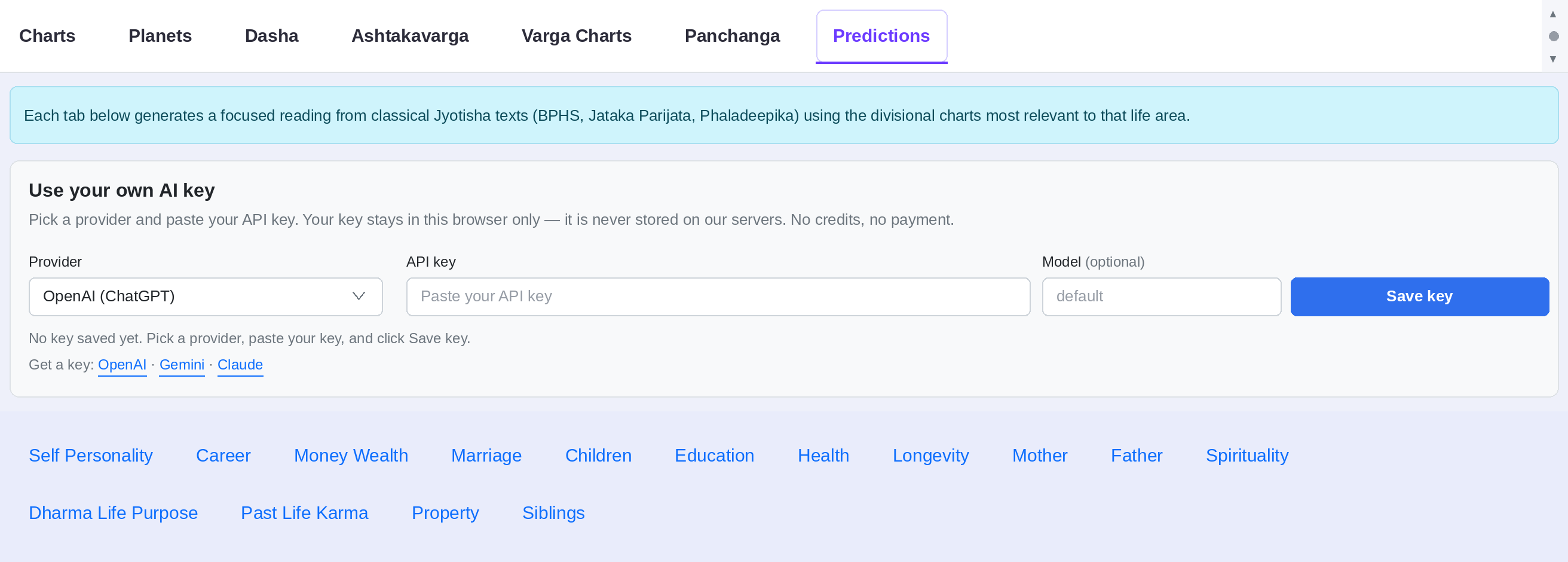
Don't want to wire up a Custom GPT or an SDK? You don't have to. The Kundli page now has a Predictions tab that runs the readings for you — you just bring your own AI API key. Pick a provider (OpenAI, Google Gemini, or Anthropic Claude), paste your key, and generate a focused reading for any life area: career, marriage, wealth, health, children, and more.
Why use our Predictions tab instead of prompting the model yourself?
Because the hard part isn't calling the API — it's the prompt. Every reading is built from a prompt template we've tuned specifically for classical Vedic astrology. Behind each button we:
- Compute the exact chart from your birth details and feed the model the divisional charts (vargas) that actually matter for that life area (e.g. D-10 for career, D-9 for marriage, D-7 for children).
- Instruct the model to reason from classical sources — BPHS, Jataka Parijata, Phaladeepika — rather than generic, sun-sign-style horoscope filler.
- Keep the output structured and chart-specific, so the prediction is grounded in your placements instead of vague boilerplate.
The result: noticeably more precise, source-grounded readings than you'd get by pasting your birth details into a chatbot yourself — and you can switch providers any time to compare how GPT, Gemini and Claude each interpret the same chart.
Where to create an API key
You'll need a key from whichever provider you choose. Each link below goes to that provider's key page:
- OpenAI (ChatGPT / GPT models) — platform.openai.com/api-keys
- Google Gemini — aistudio.google.com/app/apikey
- Anthropic (Claude) — console.anthropic.com/settings/keys
Create the key, copy it, then open the Kundli page, generate a chart, switch to the Predictions tab, paste your key, and click any life area to get your reading.
Prefer to build your own app or plug GrahaJyoti into a Custom GPT / Claude Desktop instead? The rest of this guide covers those developer setups using our public astrology API.
1. Prerequisites
- A free GrahaJyoti account (sign in with Google from any page).
- One API key from the API Dashboard. Treat it like a password.
- The API Reference for every endpoint and its parameters.
- For ChatGPT: a ChatGPT account that can build Custom GPTs.
- For Claude Desktop: the Claude Desktop app and Node.js 18+ on your machine.
- For Claude API: an Anthropic API key and the official SDK (
anthropicfor Python or@anthropic-ai/sdkfor Node).
2. Sanity-check the API
Before wiring anything up, confirm your key works from the command line:
curl -i -H 'X-API-Key: mkc_live_…' \
  https://grahajyoti.com/api/v1/health
You should get back a 200 OK with a small JSON envelope. Refresh the
dashboard — the call should appear under
Recent calls. If it does, every option below will work.
3. Option A — ChatGPT Custom GPT (Actions)
This is the fastest path. ChatGPT imports our OpenAPI spec directly and generates a tool per endpoint.
1Create the GPT
In ChatGPT go to Explore GPTs → Create, then click the Configure tab.
2Add an Action
Scroll to Actions and click Create new action. In the Schema field, click Import from URL and paste:
https://grahajyoti.com/api/v1/openapi.json?profile=actions
ChatGPT parses the spec and lists each endpoint as a tool the GPT can call.
The ?profile=actions parameter is important: ChatGPT Custom GPTs allow a
maximum of 30 operations per schema, so this preset returns a trimmed,
Actions-friendly spec (it drops the meta/discovery routes and caps the count). Want a
narrower toolset? Use tag filters instead, e.g.
?tags=charts,kp or ?tags=charts&max=20. The unfiltered
/api/v1/openapi.json (all endpoints) still powers Swagger and the MCP server.
3Add authentication
Under Authentication, choose:
- Type: API Key
- Auth Type: Custom
- Header name:
X-API-Key - API Key: your
mkc_live_…value
4Tell the GPT what to do
In the GPT's Instructions add something like:
You are a Vedic astrology assistant using the GrahaJyoti API.
You have a tool for every calculation below - pick the most
specific one for the user's question.

DEFAULT: For any chart request, call post_charts with the birth
details. It returns D1 + D9, planets, houses, panchanga, Bhava
Chalit (true house cusps), and the mahadasha timeline. Keep it
lean; only widen when the user asks:
- More divisional charts -> add charts:"all" or a list like
  ["D10","D24"] to the same call.
- Dasha timing/predictions -> call post_charts_dasha with
  dasha_depth:"antar". Use "pratyantar" ONLY if explicitly asked
  (large payload) - never unprompted.

ALL AVAILABLE TOOLS (use the specific one when relevant):
- Charts: post_charts (full+bhava chalit), post_charts_varga
  (single D-chart, needs division), post_charts_dasha,
  post_charts_strength (Shad Bala), post_charts_panchanga,
  post_charts_transit, post_charts_manglik (Mangal dosha),
  post_charts_retrograde, post_charts_combustion,
  post_charts_friendship, post_charts_karaka (Chara Karaka),
  post_charts_nakshatra, post_charts_dignity,
  post_charts_aspects (Graha Drishti).
- KP (Krishnamurti Paddhati): post_kp_full, post_kp_planets,
  post_kp_cusps, post_kp_nakshatra_nadi, post_kp_significators,
  post_kp_ruling_planets, post_kp_dasha.
- Classical: post_ashtakavarga (BAV/SAV),
  post_bhava_chalit (standalone true houses).
- Compatibility: post_match (Ashtakoota gun-milan; needs both
  people's birth details; method North|South).
- Reference (no birth data): get_reference_nakshatras,
  get_reference_rashis, get_reference_planet_relations,
  get_reference_friendship_rules, get_reference_karaka_definitions.
- Utilities: post_utils_timezone_lookup (lat/lon -> timezone).

Always mention the ayanamsha used, ground every claim in the
returned data, summarize in plain English, and never dump raw JSON.5Test & publish
Use the preview pane on the right. Try: "Generate a kundli for 5 June 1990, 06:42 AM, New Delhi." Each successful call shows up in your dashboard within seconds, with latency and status code.
4. Option B — the ready-made MCP server (Claude Desktop, Cursor & more)
You no longer need to hand-write an MCP server — GrahaJyoti ships one. It lives in the repo
under mcp-server/ and is a generic OpenAPI → MCP bridge:
on startup it reads the API's own
spec and exposes
one tool per endpoint (~34 today — full kundli, single vargas, dasha,
panchanga, KP, ashtakavarga, bhava-chalit, match-making, reference tables…). Because the spec is
the source of truth, the tools never drift from the API.
X-API-Key header on every call, so the same mkc_live_… key from the
API Dashboard works unchanged.
Meta/reference tools need no key at all.
1Get the server
git clone https://github.com/manipuraco/mkc.git
cd mkc/mcp-server
npm install        # needs Node.js 18+
Sanity-check that it starts and picks up your key:
MKC_API_KEY=mkc_live_… node server.mjs
# -> [grahajyoti-mcp] loaded 34 tools …
# -> [grahajyoti-mcp] ready on stdio2Register it with Claude Desktop
Open (or create) the config file:
- macOS:
~/Library/Application Support/Claude/claude_desktop_config.json - Windows:
%APPDATA%\Claude\claude_desktop_config.json
Add an entry under mcpServers using the absolute path to server.mjs:
{
  "mcpServers": {
    "grahajyoti": {
      "command": "node",
      "args": ["/absolute/path/to/mkc/mcp-server/server.mjs"],
      "env": {
        "MKC_API_KEY": "mkc_live_…",
        "MKC_API_BASE": "https://grahajyoti.com/api/v1"
      }
    }
  }
}3Restart Claude Desktop
Fully quit and relaunch (don't just close the window). The grahajyoti tools appear in the
tools menu. Try:
“Use the post_charts_varga tool for 1990-06-05, 06:42, lat 28.61, lon 77.21, tz Asia/Kolkata, division D9, and summarize the Navamsa.”
Use it anywhere else
It's the same stdio command for every MCP client — only the registration differs:
- Cursor — add the same
command/args/envblock to~/.cursor/mcp.json(or a project.cursor/mcp.json). - Claude Code —
claude mcp add grahajyoti -e MKC_API_KEY=mkc_live_… -- node /absolute/path/to/mkc/mcp-server/server.mjs - Self-hosted / remote — run with
MCP_HTTP_PORT=8787to serve a streamable-HTTP MCP endpoint instead of stdio, then point any MCP-capable client (including MCP connectors) at the URL. Put it behind TLS — the URL carries your key.
5. Option C — Claude API tool use (for your own app)
If you're building your own product on top of Claude (not just chatting in Desktop), use the
Anthropic SDK and define tools whose schemas mirror the OpenAPI operations. Inside the tool-call
loop, fetch the GrahaJyoti endpoint with the X-API-Key header.
// Node, @anthropic-ai/sdk
import Anthropic from "@anthropic-ai/sdk";
const ai = new Anthropic();

const KEY  = process.env.MKC_API_KEY;
const BASE = "https://grahajyoti.com/api/v1";

const tools = [{
  name: "kundli",
  description: "Generate a Vedic birth chart from birth details.",
  input_schema: {
    type: "object",
    properties: {
      date: { type: "string" }, time: { type: "string" },
      lat:  { type: "number" }, lon:  { type: "number" },
      tz:   { type: "string" },
    },
    required: ["date","time","lat","lon","tz"],
  },
}];

async function callMkc(name, args) {
  const url = new URL(BASE + "/charts/" + name);
  for (const [k,v] of Object.entries(args)) url.searchParams.set(k, v);
  const r = await fetch(url, { headers: { "X-API-Key": KEY } });
  return r.text();
}

let messages = [{ role: "user", content: "Kundli for 5 Jun 1990 06:42 New Delhi" }];
while (true) {
  const reply = await ai.messages.create({
    model: "claude-sonnet-4-6",
    max_tokens: 1024,
    tools, messages,
  });
  if (reply.stop_reason !== "tool_use") { console.log(reply); break; }

  const tu = reply.content.find(b => b.type === "tool_use");
  const result = await callMkc(tu.name, tu.input);
  messages = [
    ...messages,
    { role: "assistant", content: reply.content },
    { role: "user", content: [{ type: "tool_result", tool_use_id: tu.id, content: result }] },
  ];
}
For higher throughput, enable prompt caching on the system prompt and tool definitions — tool schemas are static, so they cache cleanly across turns.
6. Troubleshooting
401 Unauthorized
The key wasn't recognised. Confirm you copied the full mkc_live_… string and that the key isn't revoked on the dashboard. If you've never created one, run php migrate_api.php on the server first — the keys table needs to exist.
404 Not Found
Hit https://grahajyoti.com/api/v1/catalog for the canonical list of method + path combinations. Endpoint paths are case-sensitive.
ChatGPT can't import the schema
Three common causes: (1) "OpenAPI spec can have a maximum of 30 operations" — import
/api/v1/openapi.json?profile=actions (or add ?tags=charts,kp) instead of the full spec.
(2) "Could not find a valid URL in servers" — make sure you're on the current
deployment; the spec now emits an absolute servers URL. (3) The importer requires a publicly reachable
HTTPS URL with valid TLS — localhost/staging won't work; use a tunnel (e.g. Cloudflare Tunnel) or the production domain.
Claude Desktop doesn't show the tools
Quit and relaunch the app fully (don't just close the window). Check the config JSON validates — a stray comma will silently disable the server. The MCP SDK logs to stderr; run the server manually with node server.mjs to see startup errors.
Latency feels high
Open the dashboard — the p50/p95 column shows whether the slowness is server-side or in the network/LLM hop. Most chart endpoints respond in < 200 ms server-side.
Spotted a bug or want an endpoint added? Open an issue on the repo — we ship API changes weekly and the OpenAPI spec is generated from code, so it never drifts.